
Printer Category
Label Printers
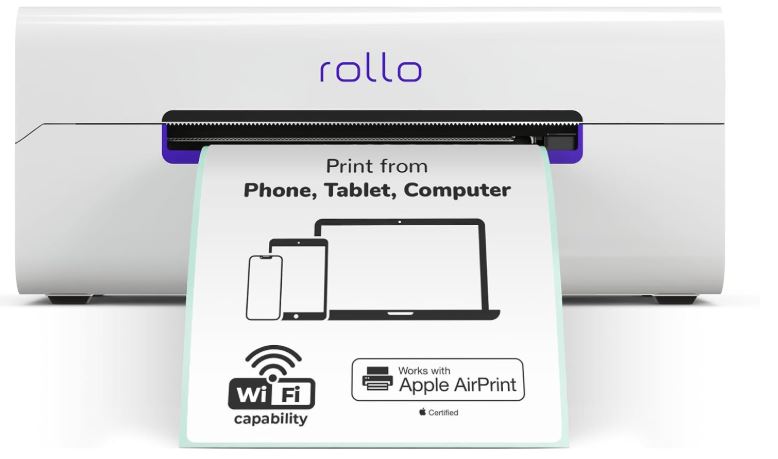
Label printers are compact, specialized machines built to print shipping labels, barcodes, and product or packaging labels quickly and at a low cost per label.
✓ Low Cost Per Label
✓ Thermal & Thermal Transfer Options
✓ Built for Shipping & Barcodes
✓ Popular with E-Commerce Sellers
Quick Answer
What Is a Label Printer? A Quick Answer
A label printer is a specialized printer designed to print on rolls or stacks of individual labels rather than full sheets of paper. Most are built for one job — printing shipping labels, barcodes, or product labels quickly and cheaply — rather than general-purpose document printing.
The majority of label printers use direct thermal or thermal transfer technology instead of ink or toner, which is why they can print so quickly and at such a low cost per label, but also why the type of label media you use matters more than with an inkjet or laser printer.
Label printers are especially common with online sellers, warehouses, and retail stores, where printing a single shipping label or barcode needs to be fast, repeatable, and cheap at high volume.
The Basics
How Label Printers Work
Label printers generally rely on one of two thermal printing methods, both different from the ink or toner used by document printers.
Direct Thermal
Uses heat-sensitive label paper that darkens when heated by the print head. There is no ink, toner, or ribbon to replace, which keeps the printer simple, but the printed labels fade over time with heat or sunlight exposure.
Thermal Transfer
Uses a heated print head to melt ink from a ribbon onto plain label stock. This produces longer-lasting, more durable labels that resist fading, smudging, and heat, at the cost of needing to replace the ribbon.
Printing a Label, Step by Step
- Design or generate the label. Shipping labels usually come from a carrier or marketplace platform; barcode and product labels come from label-design software.
- Send the print job. The label printer receives the file over USB, Wi-Fi, or Bluetooth, sized to match the loaded label roll.
- Print and advance. The printer prints one label at a time, usually with an automatic cutter or a tear bar to separate each label from the roll.
Most consumer label printers handle this entire process automatically once connected to shipping or label-design software, so day-to-day use mostly involves loading label rolls and confirming the correct label size is selected.
Getting Connected
Software, Drivers, and Platform Integration
Label printers rely heavily on software integration, since most labels are generated by a shipping platform, marketplace, or label-design program rather than typed directly into the printer.
Many label printers include their own lightweight printing app or browser-based tool for simple use, while also supporting direct integration with major shipping carriers and e-commerce marketplaces through installable drivers or plugins.
Before buying, it is worth checking whether your specific shipping software or marketplace has a listed integration for the printer model you are considering, since setup is far smoother when a direct integration already exists rather than relying on a generic driver.
The Lineup
Types of Label Printers
Label printers range from simple consumer shipping-label printers to industrial systems built for continuous warehouse use, and the right type depends heavily on volume and how long the labels need to last.
📦
Direct Thermal Label Printers
The most common type for shipping labels, such as the Rollo and DYMO LabelWriter lines. Simple, ribbon-free, and inexpensive to run, but labels fade with heat and prolonged sunlight exposure, making them best for short-term use.
🏷️
Thermal Transfer Label Printers
Use a ribbon to produce durable, long-lasting labels, ideal for product, asset, and compliance labels that need to stay legible for months or years in storage or in the field.
🖥️
Desktop Barcode Printers
Compact printers for retail and warehouse barcode labels, typically supporting both direct thermal and thermal transfer printing in one machine for flexibility.
🏭
Industrial Label Printers
Heavy-duty, high-volume printers built for continuous warehouse or manufacturing use, with larger ribbon and label capacity and faster throughput than desktop models.
Most online sellers and home offices only need a direct thermal shipping-label printer; thermal transfer and industrial models are mainly relevant for product labeling and high-volume operations where label longevity or throughput matters more.
Where It Fits
Best Use Cases for Label Printers
Label printers are widely used for shipping and address labels, barcode and inventory labels in warehouses and retail, and product and packaging labels. E-commerce sellers in particular rely on label printers to generate shipping labels quickly without paying per-page costs the way a standard inkjet or laser printer would.
📬
Shipping & Address Labels
The single biggest use case: printing postage and shipping labels directly from marketplace and carrier platforms, without paying full-page ink or toner costs for each one.
📊
Barcode & Inventory Labels
Warehouses and retailers print barcode labels for inventory tracking, shelf tags, and point-of-sale scanning, often at high daily volumes.
🏷️
Product & Packaging Labels
Small manufacturers and makers use label printers for product labels, ingredient or compliance labels, and packaging branding on short runs.
🪪
Name Badges & Office Labels
Offices use label printers for name badges, file labels, and organizational labeling where speed and simplicity matter more than full-color printing.
💲
Retail Price Tags
Retail stores print price tags and shelf labels quickly, often integrated directly with point-of-sale or inventory software.
🔖
Asset Tracking Labels
Businesses use durable thermal transfer labels to tag equipment and assets for tracking, warranty, and maintenance schedules over the long term.
A dedicated label printer is worth it for anyone printing shipping labels regularly, such as online sellers and small warehouses, or businesses that need barcode and inventory labels. If your labeling needs are occasional, a standard printer with label sheets may be enough, but frequent shippers typically save money and time with a dedicated label printer.
Compare Specs
Key Features to Compare
Before buying, weigh these features against how many labels you print and which platforms you need to support. Volume and label longevity matter more for this category than raw print resolution.
Before buying, weigh these features against how many labels you print and which platforms you need to support.
Budget Planning
Running Costs of Label Printing
Label printers are generally inexpensive to run compared with inkjet or laser printers, but costs still vary by label type and volume.
Label Rolls
Direct thermal label rolls are typically the cheapest consumable; thermal transfer label stock costs a bit more but lasts longer.
Ribbons
Thermal transfer printers need ribbons as an ongoing cost, priced roughly by how many labels one ribbon can print.
Print Head Wear
Print heads are a wear part on any thermal printer and may eventually need replacement, especially under heavy daily use.
Software/Platform Fees
Some shipping platforms charge subscription or per-label fees independent of the printer itself, which is worth checking before committing to one ecosystem.
Overall, label printers tend to have a very low cost per label compared with printing shipping labels on a standard inkjet or laser printer, which is the main reason frequent shippers switch to a dedicated machine.
Budgeting for a label printer is simpler than for most other printer categories since there is no toner cartridge replacement cycle to plan around — the main ongoing decisions are which label stock to buy and whether a ribbon is needed.
Weigh the Trade-offs
Label Printer Pros and Cons
Label printers trade general-purpose flexibility for speed and low cost on one very specific job.
Advantages
✓ Very low cost per label compared with printing on a standard printer
✓ Fast, purpose-built printing for shipping and barcode labels
✓ No ink or toner needed for direct thermal models
✓ Compact footprint that fits easily on a desk or packing station
✓ Widely supported by e-commerce and shipping platforms
Disadvantages
✗ Limited mostly to label printing rather than general documents
✗ Direct thermal labels fade over time with heat or sunlight
✗ Thermal transfer models require ribbons as an ongoing cost
✗ Label media size options can be more limited than standard paper
✗ Not useful for full-page documents or photo printing
The Alternative
Label Printer vs. Standard Printer
Many people start out printing labels on sheet stock with a standard inkjet or laser printer before switching to a dedicated label printer once volume picks up.
| Label Printer | Standard Inkjet/Laser Printer | |
|---|---|---|
| Best for | Shipping labels, barcodes, repetitive single-label jobs | Documents, photos, and general mixed printing |
| Cost per label | Low; no ink or toner for direct thermal models | Higher, since ink or toner is used per label sheet |
| Speed for labels | Fast, purpose-built single-label printing with auto-cut | Slower; usually prints a full sheet of labels at once |
| Versatility | Narrow; mostly limited to label media | Broad; handles documents, photos, and labels on sheet stock |
If you also print documents regularly, see our comparison of thermal vs. inkjet printers for a closer look at how the underlying technologies differ.
There is no wrong answer at low volume — it mainly comes down to whether the convenience of a single all-purpose printer outweighs the lower running cost of a dedicated label printer once you are shipping regularly.
Decision Guide
How to Choose a Label Printer
Work through these questions in order to narrow down the right label printer for your situation. Most buyers can settle on a short list after the first two or three.
01
What will you print most? Shipping labels point toward a direct thermal printer; durable product or asset labels point toward thermal transfer.
02
What label size do you need? Standard 4×6-inch labels cover most shipping needs; confirm the printer supports any smaller or custom sizes you require.
03
Which platforms do you need to support? Check compatibility with the specific carriers, marketplaces, or shipping software you already use.
04
How many labels do you print per day? Higher daily volume favors a printer with an automatic cutter and faster print speed.
05
Do you need Wi-Fi or Bluetooth? Wireless connectivity is useful for shared packing stations or printing from a phone or tablet.
06
Will labels need to last a long time? If labels must resist fading, heat, or sunlight for months or years, thermal transfer is the more reliable choice.
Once you have answers to these questions, narrowing down to two or three specific models and comparing their published specifications and user reviews is usually enough to make a confident decision.
Our Picks
Popular Label Printers
These models are well-known examples across direct thermal shipping printers and thermal transfer printers. See our full review for hands-on testing details where available.

Rollo Wireless Printer X1040
A popular wireless direct thermal shipping-label printer aimed at e-commerce sellers who need fast, no-ink label printing.
Check Current Price🏷️
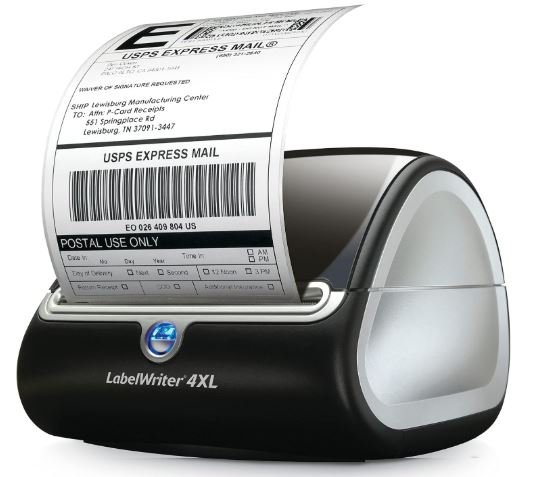
DYMO LabelWriter 4XL
A widely used direct thermal printer known for straightforward shipping-label printing and broad marketplace compatibility.
Check Current Price🏭
MUNBYN ITPP941
A thermal label printer often used for both shipping and barcode labels in small warehouse and retail settings.
Check Current Price💲
Budget-Friendly Models
Entry-level direct thermal printers from various brands cover light shipping-label use at a lower upfront cost.
For general barcode or sticker printing beyond shipping labels, our best printers for stickers roundup covers additional options.
As with most printer categories, exact model lineups and pricing change over time, so checking current availability and recent reviews before buying is always worthwhile.
Avoid These
Common Label Printing Mistakes
Most label printing problems come down to a mismatch between the label media, the printer settings, or the software platform being used, and nearly all of them are easy to avoid once you know what to check.
📏
Using the Wrong Label Size
Printing a 4×6 shipping label on the wrong roll size causes cropped or misaligned labels and wasted media, which adds up quickly at volume.
☀️
Choosing Direct Thermal for Long-Term Labels
Direct thermal labels fade with heat and sunlight, so they are a poor choice for product or asset labels that need to stay legible for months or years.
⚙️
Not Calibrating the Printer
Skipping gap or black-mark sensor calibration after a media change can cause labels to print offset, skip, or waste the first few labels on a new roll.
🔌
Ignoring Platform Compatibility
Buying a printer before confirming it works with your shipping or marketplace software can lead to driver issues or unsupported label formats after purchase.
🧽
Letting the Print Head Get Dirty
Adhesive residue and dust on the print head can cause streaky or faded prints over time if it is never cleaned with isopropyl alcohol and a soft cloth.
💰
Buying More Printer Than Needed
An industrial-grade label printer is overkill for someone printing a handful of shipping labels a day; matching the printer to actual volume saves money upfront and in running costs.
Keep It Running
Maintenance and Care
Label printers are relatively low-maintenance machines, but a few simple habits keep print quality consistent over years of use.
- Clean the print head regularly. Adhesive residue and dust buildup on the print head can cause faded or streaky labels over time.
- Store label rolls properly. Keep label media away from direct sunlight and heat, especially direct thermal labels, which are sensitive to both.
- Recalibrate after media changes. Switching label sizes or rolls often requires recalibrating the printer’s label-gap sensor.
- Replace ribbons before they run out mid-batch. Keep a spare ribbon on hand for thermal transfer printers to avoid interrupting a print run.
- Check firmware and driver updates. Occasional updates can improve compatibility with shipping platforms and marketplaces.
FAQ
Frequently Asked Questions
Next Step
Is a Label Printer Right for You?
A label printer is a strong choice if you regularly print shipping labels, barcodes, or product labels and want a lower cost per label than a standard printer offers.
Think about your total monthly label volume, not just today’s needs — a printer sized for a small side business may need replacing quickly once order volume grows.
It is less useful if your printing needs are mostly documents and photos, or if you only print a handful of labels occasionally, in which case label sheets on your existing printer may be simpler.
On This Page
Table of Contents
- What Is a Label Printer?
- How Label Printers Work
- Software & Platform Integration
- Types of Label Printers
- Best Use Cases
- Key Features to Compare
- Running Costs
- Advantages and Disadvantages
- Label vs. Standard Printer
- How to Choose a Printer
- Popular Label Printers
- Common Mistakes
- Maintenance and Care
- Frequently Asked Questions
- Is It Right for You?
Related Printer Categories
Featured Guide
Best Printers for Stickers
See our picks for printers that handle sticker and label printing well.
View GuidePopular Reviews
Still Deciding?
Compare Thermal vs. Inkjet Printers
Not sure a dedicated label printer is the right fit? See how thermal and inkjet technology compare before you decide.